What Capture Sessions Actually Looks Like
The landscape charts don't fit in an App Store screenshot. So here they are — real captures, real spikes, and the honest gaps I refuse to hide.
Or: the pictures I couldn’t fit on the App Store, and the connections they caught misbehaving.
One of the best parts of building TrueSignal is that folks actually use it, and then they send me pictures. A capture from a kitchen table in one time zone, a spike caught on a train in another. I love it every single time.
Here’s the thing though…those pictures never made it onto the App Store. Not because they aren’t good. Because they’re sideways.
Capture Sessions is at its best in landscape, full-width, scrolling right to left like a stock ticker. And the App Store wants tidy little portrait thumbnails. So the coolest view in the whole app has basically been hiding.
TL/DR: This is a picture-heavy post. Capture Sessions records a witnessed timeline of your connection quality and exports it as a defensible PDF, and it looks way cooler in landscape than the store screenshots let on. Below are real captures…a couple of them caught my own connection doing things my bars swore weren’t happening. If you’ve got Pro, go turn your phone sideways during a recording. If you don’t, this is the reason to.
The view the App Store never shows you
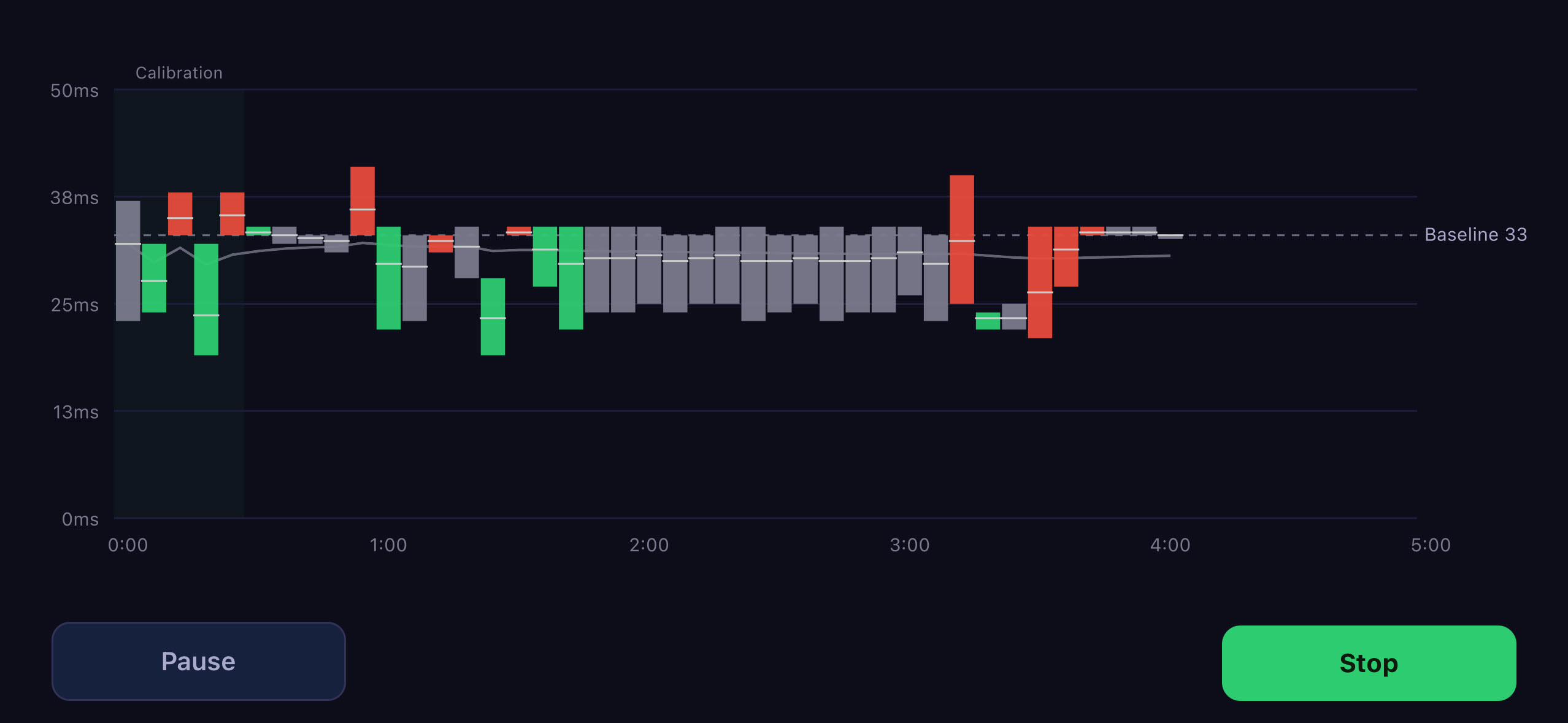
Turn the phone sideways while a capture is running and this is what you get. The whole chart stretches out. The axis auto-scales to your actual latency (here it’s a tight 0–50ms band, so you can see every wobble). The baseline sits there as a dashed line so you always know what “normal” looks like for this network.
Green candle, things got better than the last bucket. Red, they got worse. Gray, holding steady. And it’s live — those candles march in from the right while you watch.
There’s a real, slightly hypnotic pleasure in watching your own connection draw itself in real time…(I may have lost more evenings to this than I’d like to admit).
When your bars are lying
Here’s the whole reason this app exists, in one screenshot.
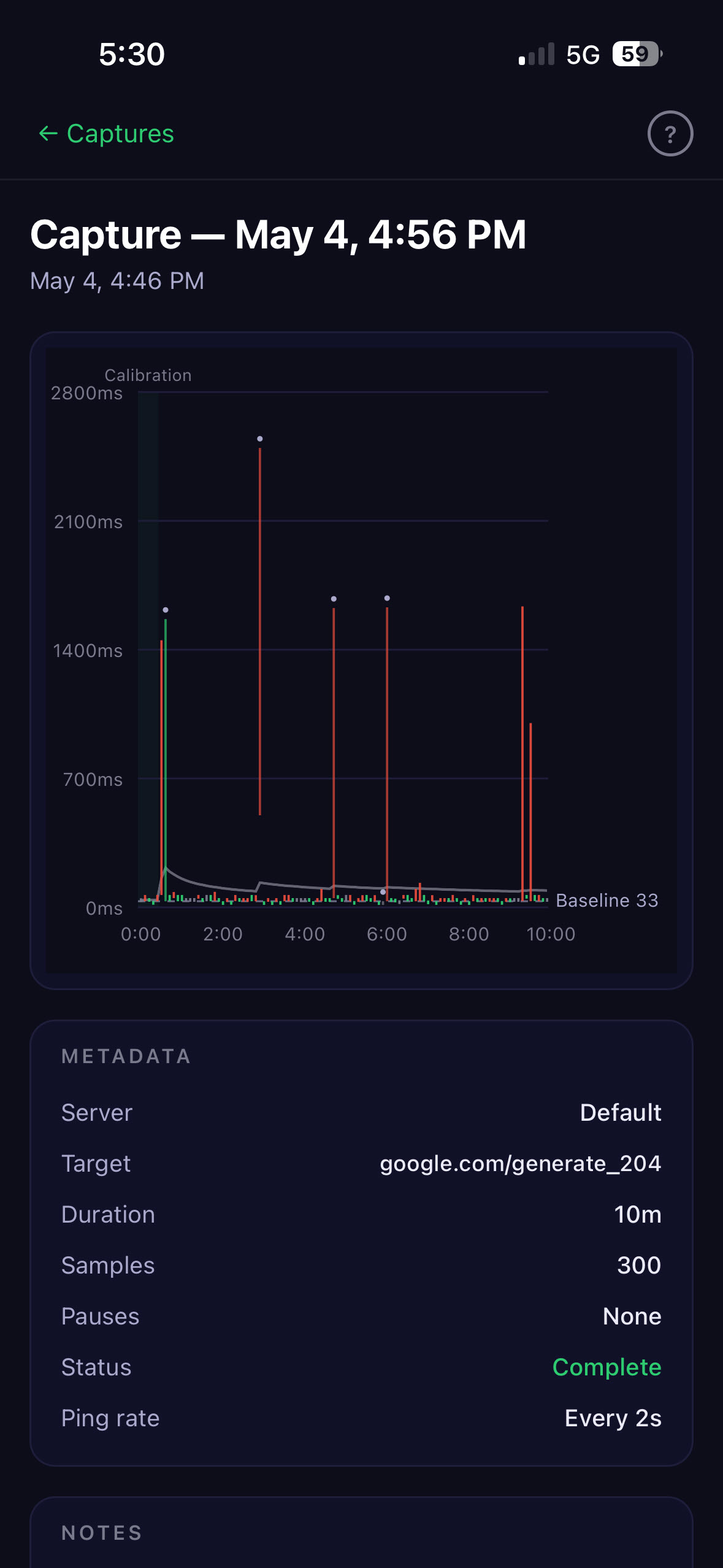
This one is mine. Real capture, real 5G, bars sitting up near the top of the phone like everything was fine.
Everything was not fine (read in your best Morgan Freeman voice!).
That baseline is 33ms. That spike is pushing 2,500ms. That’s the difference between a call that’s crystal clear and a call where you say “sorry, you cut out, can you repeat that?” for the fourth time. Your bars will never tell you this happened. Capture Sessions did.
If you want the calmer version of the same story:
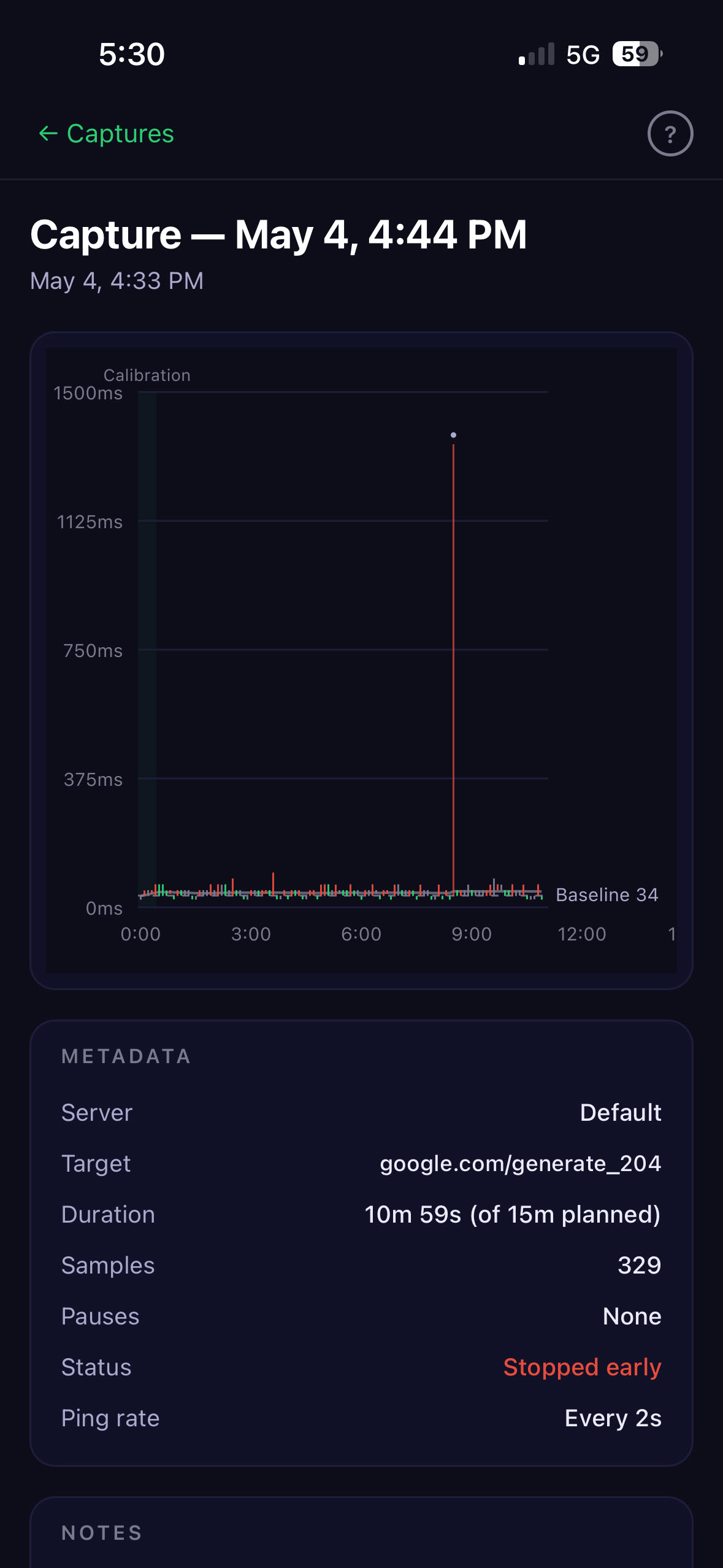
One clean punch. A flat, well-behaved connection…and then a single 1,400ms spike out of nowhere. When that one spike lands during the exact 30 seconds you were submitting something important, “it’s fine now” from your ISP doesn’t cut it. Now you’ve got the timestamp.
The slow bleed, not just the spike
Spikes are dramatic. But a lot of bad connections don’t spike…they just quietly get worse and stay there. A brownout, not a blackout.
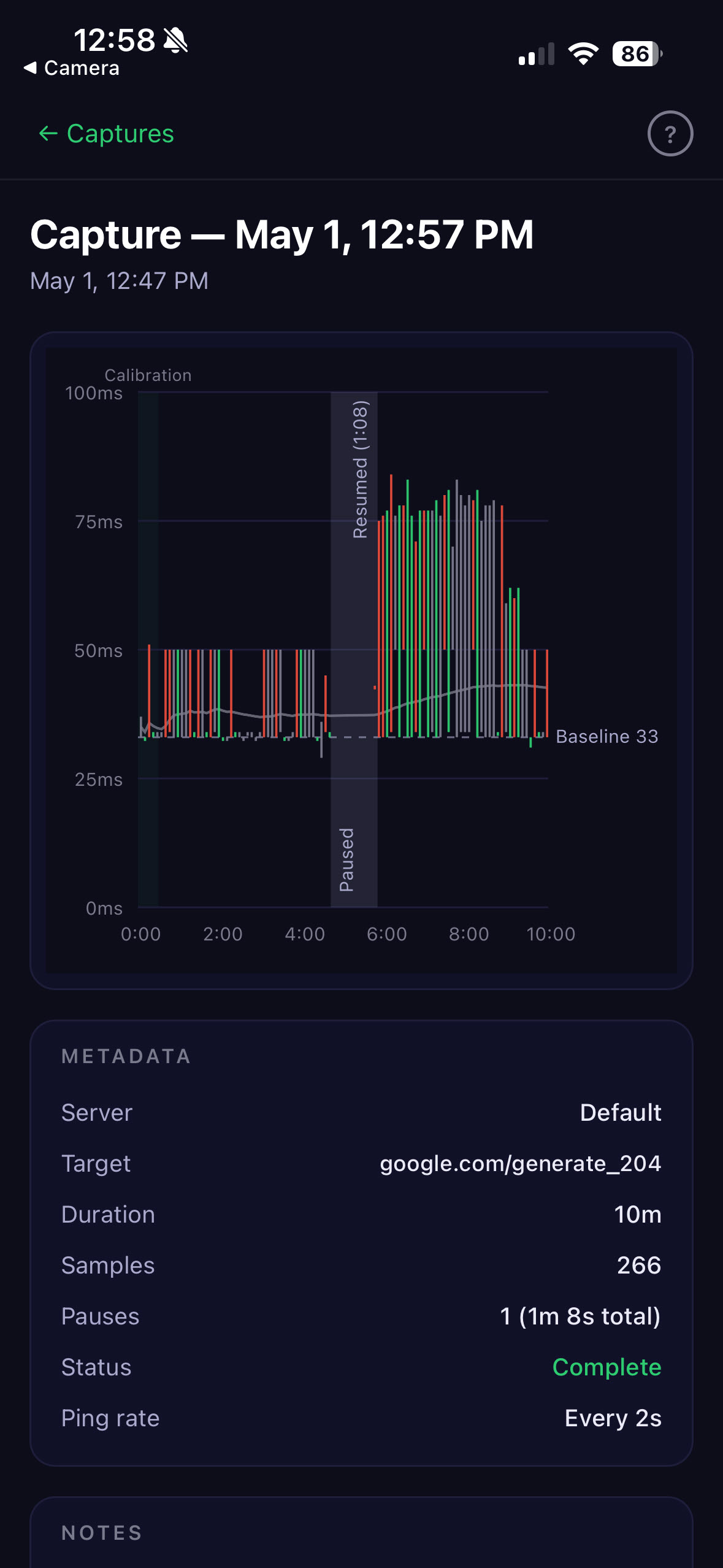
See how the whole right half lifts off the baseline and stays there? That’s the connection you’ve been complaining about for a week. Not broken. Just…worse. Consistently, provably worse than it should be.
That’s the stuff a one-shot speed test will never catch, because you’d have to happen to run it during the bad stretch. Capture Sessions is running the whole time. It doesn’t miss the bad stretch.
The part I’m proudest of: the honest gap
Now here’s a design decision I’ll defend to anyone.
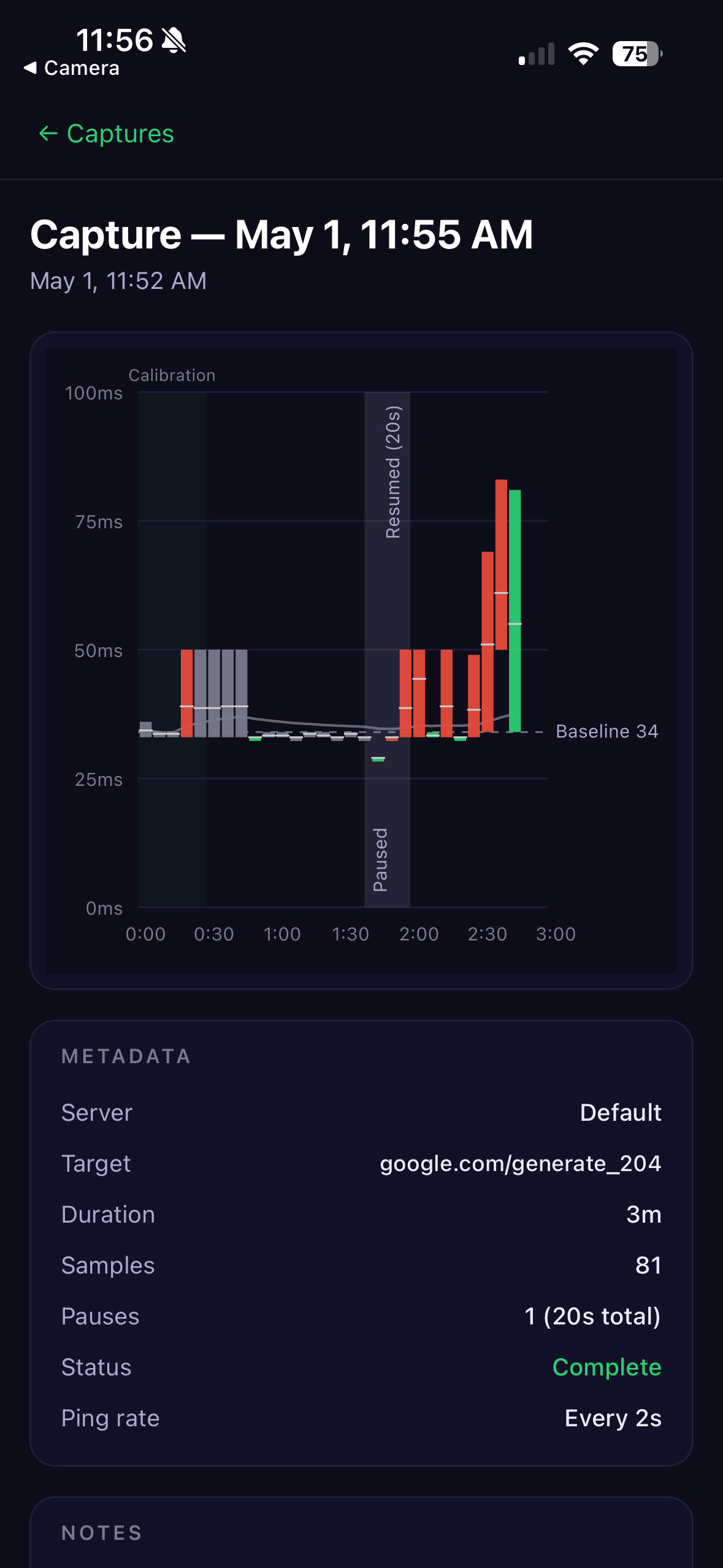
See that shaded band labeled “Paused / Resumed”? That’s TrueSignal telling on itself. The metadata spells it out too — one pause, 20 seconds.
iOS does not let a backgrounded app reliably ping things on a schedule. It’s a hard platform limit and there’s no clean way around it (believe me, I tried…many times). So if you leave the app mid-recording, the ping engine hard-stops.
Now, I could smooth over that gap. Fill it in with pretend samples so the chart looks prettier and more complete. It would look great!
It would also be a lie. And the entire point of TrueSignal is that it doesn’t lie to you.
So instead we draw the gap right on the chart as a shaded band, label it, and document it in the exported PDF down to the second. If your ISP looks at your export and sees a 20-second pause…good. That’s part of the honest record. The honest version of the data IS the data.
Why locked, and why it matters
You’ll notice you don’t get a lot of knobs to turn. You pick the duration (1 to 60 minutes) and the server. That’s it. Ping rate is locked at every 2 seconds. Bucket size is locked at 6 seconds. You can’t extend a recording once it starts, either — stop early, sure, but no tacking on “just five more minutes” until you finally catch a bad one.
That’s on purpose. Every knob you could turn is a knob someone could turn to game the result…and the whole value of the artifact is that it can’t be gamed. Every Capture Session ever produced by TrueSignal uses the same methodology. Same ping rate. Same buckets. Same fair witness, every time.
The customization-loving developer in me hated locking it down. The guy who wants your ISP to take the export seriously locked it down anyway.
One more thing: try it on an iPad
If you’ve got an iPad, turn Capture Sessions loose on it. The big landscape screen is where this chart was born to live…honestly one of the best ways to experience the whole app. Nothing on the store page tells you that, which is on me.
Go turn your phone sideways
If you’ve got Pro, here’s your homework: start a capture, and rotate the phone. That landscape view is the best-kept secret in the app, and now that I’ve seen how few people find it, that’s on me for hiding it in an App Store thumbnail.
And a small confession…Capture Sessions was built to win arguments with ISPs, but that’s not mostly how I use it anymore. I’ve walked all over my house and property with it running, just to know. The far corner of the yard. The metal outbuilding where the WiFi goes to die. I hate not having an answer to a nagging question (I’ve written a couple of books just to answer questions that were bugging me!), and this scratches exactly that itch.
TrueSignal Pro is still less than a single (small) cup of coffee, and Capture Sessions is the headline reason to have it.
So — go run one. Turn the phone sideways. Then send me what you catch. Where are you using it? What did your connection do when it thought no one was watching? What do you wish the export had on it?
I read every one. The captures folks send me are, hands down, one of the coolest parts of this whole thing.
And there’s something really cool in the works for the next release…but more on that another day!
Dave